
dify 1.13.2 安装部署 && vplark
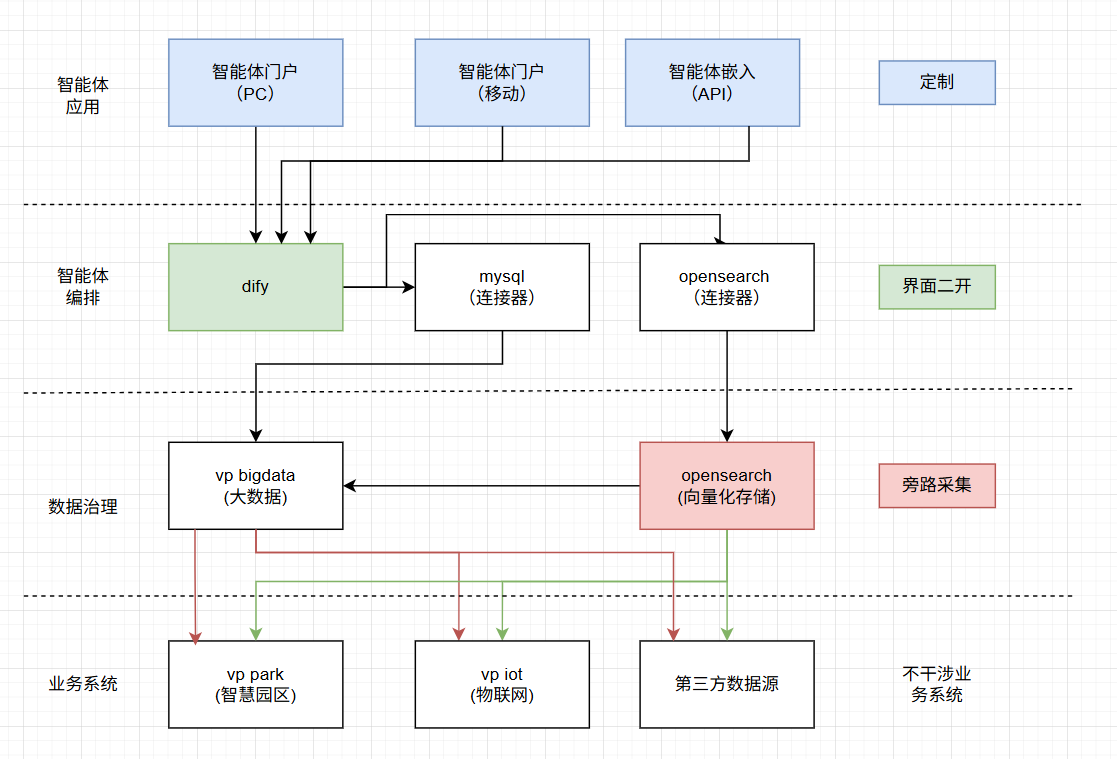
架构示意图
安装
下载最新版:https://github.com/langgenius/dify/releases
修改docker-compose.yaml被墙的镜像地址
- init_permissions
- api
- worker
- worker_beat
- web
- db_postgres (非必须,取决于你使用什么数据库)
- db_mysql (非必须,取决于你使用什么数据库)
- redis
- sandbox
- plugin_daemon
- ssrf_proxy
- nginx
- weaviate (非必须,取决于你使用什么向量库)
- opensearch (非必须,取决于你使用什么向量库)
- opensearch-dashboards (非必须,取决于你使用什么向量库)
如果使用opensearch但是没有修改其他配置、想使用一键启动
修改 opensearch 、 opensearch-dashboards
    networks:
      - opensearch-net
      - default # if you want to access opensearch from other services, you need to add it to the default network.
启动命令
# 使用mysql和opensearch
docker-compose --profile mysql --profile opensearch up -d

# 默认
docker-compose --profile postgresql --profile weaviate up -d
编写配置文件
.env
CONSOLE_API_URL=
CONSOLE_WEB_URL=
SERVICE_API_URL=
APP_API_URL=
APP_WEB_URL=
FILES_URL=

# 对外公布的服务端口
EXPOSE_NGINX_PORT=80
EXPOSE_NGINX_SSL_PORT=443

# 是否开启检查版本策略,若设置为 false,则不调用 https://updates.dify.ai 进行版本检查。
# 由于目前国内无法直接访问基于 CloudFlare Worker 的版本接口,
# 设置该变量为空,可以屏蔽该接口调用
CHECK_UPDATE_URL=

# Python pip 镜像源地址,用于加速 Python 包下载
PIP_MIRROR_URL=https://pypi.tuna.tsinghua.edu.cn/simple


# 主数据库,dify自己也需要一个数据库
# Database type, supported values are `postgresql`, `mysql`, `oceanbase`, `seekdb`
DB_TYPE=mysql
# For MySQL, only `root` user is supported for now
DB_USERNAME=root
DB_PASSWORD=difyai123456
DB_HOST=db_mysql
DB_PORT=3306
DB_DATABASE=dify

# 向量数据库配置,可选值有:weaviate 、 opensearch
# VECTOR_STORE=weaviate
VECTOR_STORE=opensearch

# Weaviate 端点地址,如:http://weaviate:8080
# WEAVIATE_ENDPOINT=http://weaviate:8080
# 连接 Weaviate 使用的 api-key 凭据
# WEAVIATE_API_KEY=WVF5YThaHlkYwhGUSmCRgsX3tD5ngdN8pkih

OPENSEARCH_HOST=opensearch
OPENSEARCH_PORT=9200
OPENSEARCH_SECURE=true
OPENSEARCH_VERIFY_CERTS=true
OPENSEARCH_AUTH_METHOD=basic
OPENSEARCH_USER=admin
OPENSEARCH_PASSWORD=admin